
ReviewFlow 0.2.0: In-App Reviews with Kotlin Multiplatform
ReviewFlow 0.2.0 brings in-app reviews to Kotlin Multiplatform: shared Android and iOS rules, StoreKit integration, and a compatible Android API.

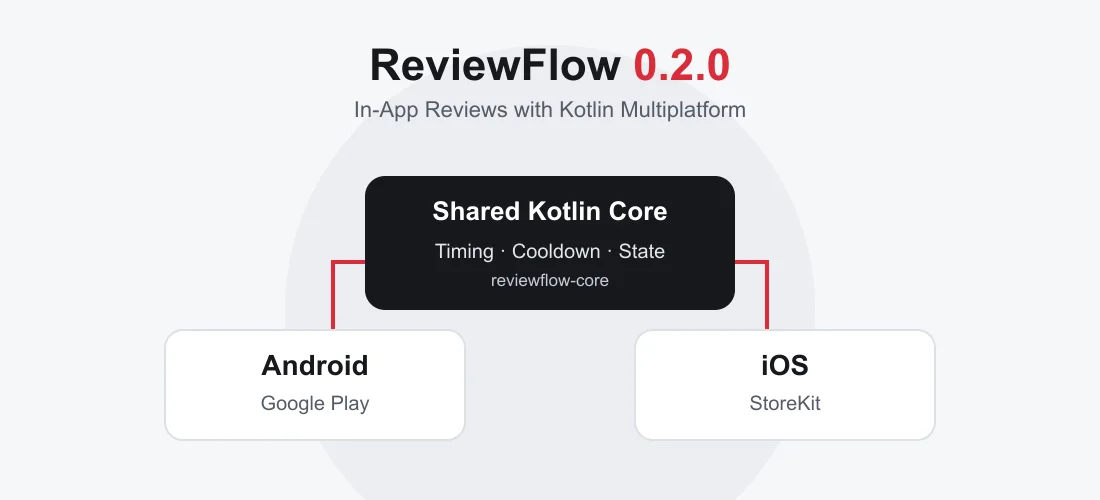
ReviewFlow 0.2.0 is out, with Kotlin Multiplatform support. The Android library for in-app review orchestration now has a shared core for Android and iOS. Timing rules, cooldowns, and once-per-version behavior can be implemented once in Kotlin. The actual review request still goes through Google Play or StoreKit.
The 0.2.0 release on GitHub extends the approach from our first Android Review Flow article: review requests belong in a component with explicit, testable rules. Teams building both Android and iOS apps can now share that logic across platforms.
What is ReviewFlow?
ReviewFlow is an open-source library that coordinates in-app review requests. It checks whether the app is eligible to make a request, persists usage counters and cooldowns, and prevents concurrent requests within an instance. Kotlin Flows expose its state and events.
A typical trigger is a successfully completed export or a saved task. The app records that success moment; ReviewFlow evaluates the configured rules. The normal app flow continues even when no review dialog appears.
What becomes shared in 0.2.0?
The new platform-neutral entry point is ReviewFlow. It brings the eligibility rules and state machine into the KMP core. Platform adapters handle the operating system integration and local persistence.
| Responsibility | Shared or platform-specific? |
|---|---|
| App starts, success moments, cooldown, and version rule | Shared Kotlin logic |
| Concurrent request coordination, state, and events | Shared Kotlin logic |
| Android review request | Google Play In-App Review API |
| iOS review request | StoreKit through a small Swift bridge |
| Persistence | DataStore on Android, UserDefaults on iOS |
| Optional Compose helpers | Still Android-specific |
The 0.2.0 documentation explains this separation and the integration options. Sharing logic does not synchronize devices: counters and cooldowns remain local to each app installation.
For product teams, the benefit is one place to maintain the rules. If a review request should only become eligible after several completed actions, that decision can be implemented and tested in shared code. The UI can still use Jetpack Compose on Android and SwiftUI on iOS.
Getting started in a KMP project
Add the core dependency to commonMain in an existing KMP module. Maven Central must be available in the project’s repository configuration:
kotlin {
    sourceSets {
        commonMain.dependencies {
            implementation("com.zleptnig:reviewflow-core:0.2.0")
        }
    }
}
Platform initialization then creates a ReviewFlow instance and passes it to shared application code. The following snippet only shows the call sites; platform adapter setup and coroutine scope ownership belong to the consuming app:
import com.zleptnig.reviewflow.core.ReviewFlow

class ReviewTriggers(private val reviewFlow: ReviewFlow) {
    // Call once per cold app start.
    suspend fun onColdStart() {
        reviewFlow.onAppStart()
    }

    // Call only after an export has completed successfully.
    suspend fun onExportCompleted() {
        reviewFlow.onSuccessMoment()
        reviewFlow.tryRequest()
    }
}
The example keeps app starts and success moments separate: an export must not also count as an app start. Returning from the background should not automatically increment the start counter either.
The defaults are at least three app starts, at least one success moment, a 30-day cooldown, and at most one completed platform request per app version. These values are configurable. They describe the library’s rules, not Google’s or Apple’s quotas.
iOS: shared rules, native StoreKit requests
On iOS, IosReviewFlow creates the instance. The consuming app implements IosReviewRequest in Swift and exports the core through its own KMP framework. The documented bridge uses AppStore.requestReview(in:) with an active UIWindowScene and requires iOS 16 or later.
The Swift bridge in the repository shows the complete integration. It first checks for a foreground scene. If none is available, it reports the request as unavailable, consuming neither the cooldown nor the once-per-version allowance. The Kotlin adapter invokes the bridge on the main dispatcher.
The project also includes a native SwiftUI demo. It displays state and events, persists counters, and provides both a StoreKit mode and simulated results. This makes integration behavior easier to inspect without depending on a visible store dialog for every check.
Existing Android apps can keep their API
Moving the library core to KMP does not require the consuming Android app to adopt KMP. For an existing core integration, update the dependency version:
implementation("com.zleptnig:reviewflow-core:0.2.0")ReviewOrchestrator.create(context), onAppStart(), onSuccessMoment(), and tryShow(activity) remain available. The existing DataStore name and keys are also preserved, so usage counters, cooldowns, and version state survive the upgrade.
Android apps using Jetpack Compose can continue using the optional module:
implementation("com.zleptnig:reviewflow-compose:0.2.0")It already includes the core and provides helpers such as rememberReviewOrchestrator() and ReviewEffect. reviewflow-compose remains Android-specific; reviewflow-core is the module gaining KMP support. The library requires Android API 23 or higher, and the Compose module also requires compileSdk 36.
A completed request is not a submitted review
The same boundary applies on both platforms: ReviewFlow controls when the app makes its request. The platform controls whether a dialog appears.
That is why the new API names the completion event ReviewFlowEvent.RequestCompleted. A true result from tryRequest() confirms that the platform API call completed. It does not prove that a dialog was visible or that a review was submitted. The older Android event name ReviewEvent.Shown is retained for compatibility and makes no such guarantee either.
For the UX, a review request must never block an important task. Google also recommends against attaching the in-app dialog to an explicit rating button, because tapping it may produce no visible result. See the Google Play in-app review guidelines and Apple’s documentation on requesting App Store reviews.
Test the rules, not dialog visibility
The shared API accepts replaceable components: ReviewPresenter, ReviewStateStore, AppVersionProvider, and Clock. Tests can therefore advance time deterministically or simulate an unavailable presentation context.
Useful checks focus on the app’s own behavior: is a request rejected before the third start? Does the version rule apply after a completed request? Is a concurrent second request rejected immediately? Can the app retry later when no valid presentation context was available?
This separation is useful beyond review requests. Kotlin Multiplatform can share a clearly bounded feature while platform integration and UI remain native. ReviewFlow 0.2.0 demonstrates that pattern with a small, concrete task. The library is licensed under Apache 2.0 and includes no analytics or tracking SDKs of its own.
FAQ
Does an existing Android app need to migrate to KMP for ReviewFlow 0.2.0?
No. The Android API from 0.1.x remains available. Existing integrations can update the dependency to 0.2.0 and continue using ReviewOrchestrator.
Is reviewflow-compose now a Compose Multiplatform library?
No. reviewflow-core is the shared KMP core for Android and iOS. reviewflow-compose remains an optional Android extension for Jetpack Compose.
Does ReviewFlow guarantee that a review dialog appears?
No. Google Play and StoreKit control whether the dialog appears. A successful request confirms completion of the platform API call, not that a dialog was visible or a review was submitted.
Source code, integration examples, and the release are available in the ReviewFlow repository on GitHub. If you want to introduce shared Kotlin logic into an existing app, creative workline can help with KMP architecture and incremental integration.